cd packaging design
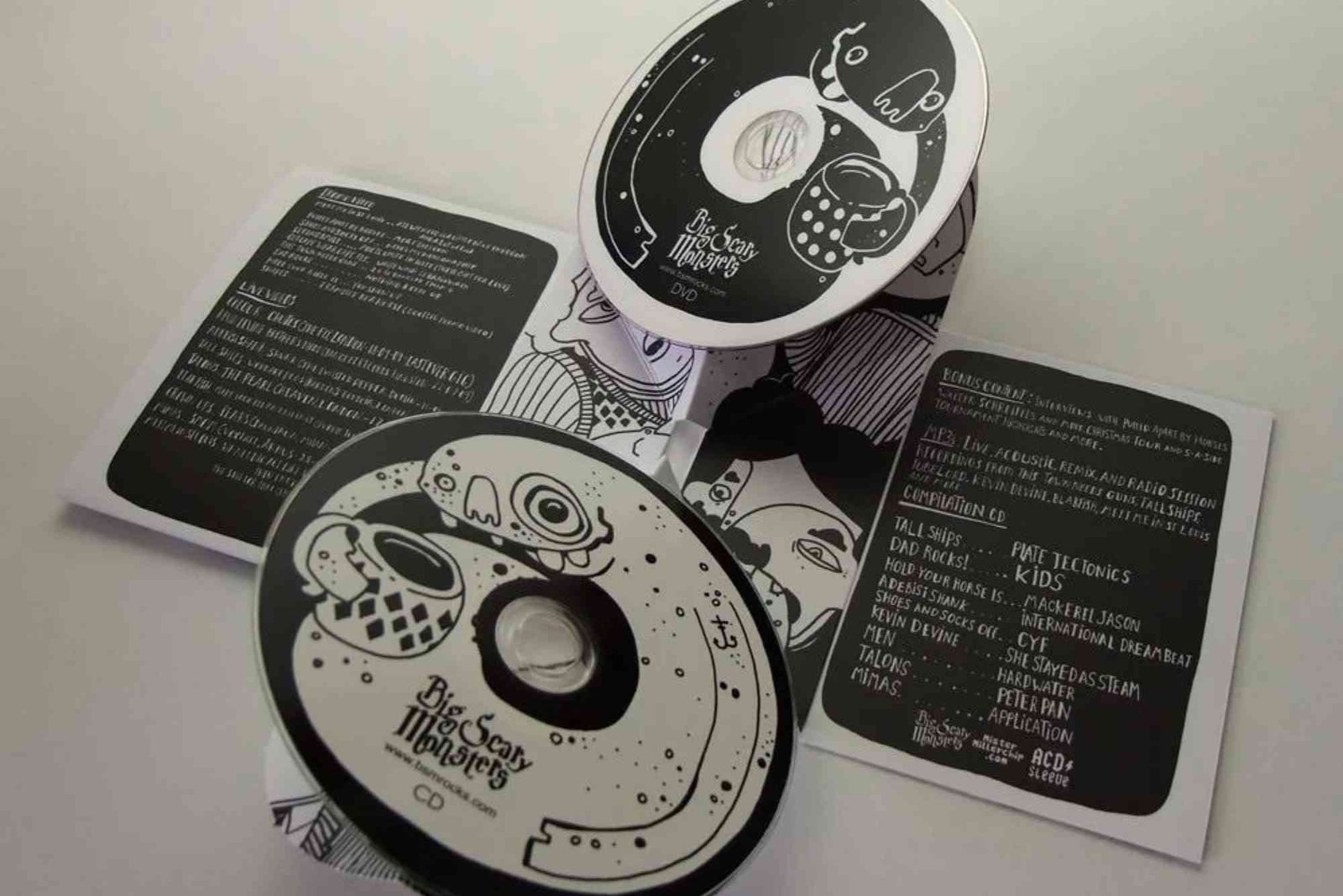
CD Packaging Design: A Complete Guide to Creating Professional CD Packaging
CD packaging design is more than an attractive cover placed around a disc. It is a visual representation of the music, artist, brand, film, presentation, or creative project inside. A well-designed package protects the CD while creating a strong first impression.
Although digital media dominates modern entertainment, physical CDs still have value. Musicians, collectors, independent artists, businesses, educational organisations, and promotional agencies continue to use physical discs. Therefore, thoughtful CD packaging design can make a product feel professional, memorable, and worth keeping.
Good packaging combines creativity with practical design. It must look appealing while also protecting the disc and communicating essential information. The best results come from understanding the audience, choosing suitable materials, planning the layout, and preparing artwork correctly for printing.
Why CD Packaging Design Still Matters
The packaging is often the first physical interaction someone has with a CD. Before listening to the music or viewing the content, the customer sees the artwork. That first impression can influence how the product is perceived.
A strong CD packaging design can communicate personality, quality, and purpose within seconds. For musicians, it can reinforce an artist’s identity. For businesses, it can support branding. For films and documentaries, it can establish the tone of the content.
Packaging also has a practical role. It protects the disc from scratches, dust, pressure, and other potential damage. Therefore, visual appeal should never come at the expense of functionality.

Understanding the Purpose of CD Packaging Design
Before opening design software, define the purpose of the project. A music album requires a different visual approach from a corporate presentation or educational CD.
Ask what the package needs to communicate. Consider the target audience, the content, the brand personality, and the intended emotional response.
For example, an electronic music album might benefit from experimental imagery and bold typography. A business presentation may require a cleaner and more restrained appearance.
The design should support the content rather than compete with it. Every image, colour, font, and graphic element should have a reason for being there.
Choosing the Right CD Packaging Format
The physical format affects both appearance and production costs. Common options include jewel cases, sleeves, wallets, and digipaks.
A jewel case provides a familiar and protective solution. It can include a front cover, back tray artwork, booklet, and disc label.
A paper sleeve offers a simpler and lighter alternative. It can work particularly well for promotional projects or limited releases.
A digipak provides more space for artwork and information. Its folding structure creates additional panels for photographs, lyrics, credits, or promotional messaging.
The right format depends on the project’s budget, audience, distribution method, and desired presentation.
Creating an Effective CD Packaging Design Concept
A successful concept begins with research. Look at existing packaging within the same market. Study how successful products use imagery, typography, composition, and colour.
However, inspiration should not become imitation. Your design should establish its own visual identity.
For music projects, listening to the album can be particularly useful. The mood, lyrics, instruments, and overall atmosphere can suggest colours, textures, images, and typography. Designers have long used the content itself as a source for visual concepts.
It is also useful to discuss the artist’s vision before developing the final concept. Clear communication reduces unnecessary revisions and helps the finished packaging represent the client’s intentions.
Using Colour Effectively
Colour plays a major role in CD packaging design. It can establish mood, create contrast, and strengthen brand recognition.
Dark colours can create a dramatic or sophisticated appearance. Bright colours can suggest energy and creativity. Neutral palettes may provide a refined corporate feel.
However, colour selection should not be based only on personal preference. Think about the audience and the content.
Also consider how colours will reproduce during printing. Colours displayed on a monitor may not look identical when printed. Professional artwork should therefore be prepared according to the printer’s specifications.
Typography and Readability
Typography can make or break a CD package. A beautiful font is ineffective if the album title or important information cannot be read.
The artist name and title should remain clear at the intended viewing size. Avoid excessive decorative fonts, particularly for longer text.
A useful approach is to combine a distinctive display typeface with a simpler font for supporting information. This creates hierarchy without making the design feel cluttered.
Typography should also remain consistent throughout the package. The cover, back panel, booklet, and disc artwork should feel like parts of the same visual system.
Images and Artwork
High-quality imagery is essential for professional CD packaging design. Blurry photographs or poorly cropped graphics can make an otherwise strong concept appear amateurish.
Use images with sufficient resolution for the final print dimensions. Consider how photographs will interact with text and other design elements.
High-contrast imagery can work particularly well for printed discs. Some printing processes struggle with subtle gradients and extremely delicate tonal details. Therefore, artwork should always be tested against the chosen production method.
If photography is used, ensure you have appropriate permission to reproduce the images. The same principle applies to illustrations, logos, fonts, and other third-party assets.
CD Packaging Design and Branding
For commercial projects, packaging should support the existing brand identity. Brand colours, logos, typography, and visual styles should work naturally within the package.
However, branding does not mean placing a logo everywhere. Effective design creates recognition without overwhelming the main artwork.
For artists, branding can be more personal. The packaging may establish a visual identity that continues across posters, websites, social media, merchandise, and future releases.
This consistency can make an artist or organisation easier to recognise.
Important Information to Include
A CD package may need more information than just the title and cover image. Depending on the project, the package can include artist details, track information, copyright notices, credits, contact information, website details, or promotional messaging.
The challenge is presenting this information without creating visual clutter.
Create a clear hierarchy. The most important information should receive the greatest visual prominence. Secondary information can use smaller type and supporting placement.
For albums, a booklet can provide additional room for lyrics, photographs, production credits, and acknowledgements.
CD Packaging Design and Print Preparation
A professional design must be prepared correctly before production. Discuss specifications with the printer before completing the artwork.
Important considerations can include document dimensions, bleed, safe areas, colour mode, image resolution, file format, and cutting requirements.
A common professional workflow involves preparing high-resolution artwork and using the printer’s templates. One documented CD project, for example, used CMYK 300-dpi artwork and printer templates for the booklet, tray card, and disc label.
Never assume that a file suitable for a computer screen is automatically ready for commercial printing.
Request a proof whenever possible. A physical proof can reveal issues with colour, alignment, typography, cropping, or readability before a larger production run.
CD Packaging Design Tips for Better Results
The most effective packaging combines visual creativity with practical thinking. These packaging design tips can help you develop a stronger final product.
Start with the audience rather than the software. Understand who will receive or purchase the CD.
Keep the main concept focused. Too many images, fonts, and decorative elements can weaken the visual message.
Make important text easy to read. A stylish design should never prevent customers from understanding what they are looking at.
Think about the physical experience. Consider how the package opens, how the disc is held, and how easily the customer can remove it.
Finally, consider sustainability. Recycled paper, reduced materials, and responsible printing options can provide alternatives to unnecessarily elaborate packaging.
Comparing Popular CD Packaging Formats
| Packaging Format | Main Advantage | Best For | Design Potential |
|---|---|---|---|
| Jewel Case | Strong protection | Albums and standard releases | High |
| Paper Sleeve | Lightweight and affordable | Promotions and simple releases | Moderate |
| Wallet | Compact presentation | Business and promotional CDs | High |
| Digipak | Premium appearance | Music and collector releases | Very high |
| Card Sleeve | Simple and flexible | Independent releases | Moderate to high |
The best choice depends on the project’s objectives. A premium album may justify a more elaborate format, while a promotional CD may benefit from simplicity and lower production costs.
How Custom Packaging Supports CD Projects
Businesses and artists sometimes need packaging that goes beyond standard formats. In such cases, Custom Packaging can help create a distinctive physical experience.
Custom solutions may allow different materials, structural designs, printed inserts, or special finishes. However, creativity should remain practical. A complicated structure can increase manufacturing costs and create problems during storage or shipping.
It is wise to discuss production requirements early. This allows the design concept to develop around realistic manufacturing limitations.
Why Location and Production Planning Matter
Production planning can affect the overall success of a packaging project. Printing, assembly, storage, and shipping requirements should be considered before final artwork is approved.
A reliable Buddy Packaging Location can become relevant when businesses need packaging production or fulfilment support. However, the designer should always understand the printer’s exact specifications before creating the final files.
This approach helps reduce costly corrections and production delays.
Common Mistakes in CD Packaging Design
One common mistake is prioritising appearance while ignoring protection. The packaging should keep the disc secure and remain practical during handling.
Another problem is poor typography. Small text, weak contrast, and overcrowded layouts can make essential information difficult to read.
Using low-resolution images is another frequent issue. Images that look acceptable on a monitor may appear poor when printed.
Designers should also avoid copying existing packaging too closely. Inspiration is useful, but originality helps establish a stronger identity.
Finally, do not skip proofreading. A spelling mistake on professionally printed packaging can be expensive to correct.
Frequently Asked Questions About CD Packaging Design
What is CD packaging design?
CD packaging design is the process of creating the visual and structural presentation surrounding a compact disc. It combines artwork, typography, branding, information, and physical packaging.
What should CD packaging include?
Depending on the project, it may include the title, artist name, photographs, track information, credits, copyright details, branding, and contact information.
What size should CD packaging artwork be?
The required dimensions depend on the selected packaging format and printer. Always use the manufacturer’s template and specifications instead of relying on a generic size.
What makes good CD packaging design?
Good CD packaging design balances visual appeal, readability, protection, brand identity, and production practicality. The strongest designs make the product attractive without sacrificing usability.
Can I design CD packaging myself?
Yes. Design software can be used to create professional artwork. However, beginners should understand print specifications, typography, colour management, image resolution, and packaging templates before sending files to production.
How can I make my CD packaging look professional?
Start with a clear concept and consistent visual identity. Use high-quality images, suitable typography, strong composition, and print-ready artwork. Always proofread the final design.
Conclusion
Effective CD packaging design combines creativity, communication, and practical production knowledge. The package should immediately communicate what the product represents while protecting the physical disc.
From choosing the right format to selecting colours, typography, imagery, and materials, every decision contributes to the final experience. Most importantly, the design should serve its audience and purpose.
Whether you are creating an album, promotional disc, business presentation, or collector’s edition, thoughtful planning can turn ordinary packaging into a memorable brand asset.
If you are preparing your next CD project, start by defining your concept and audience. Then develop the artwork around the physical format and printing requirements. Use these packaging design tips to create a polished result that looks professional from the first glance to the final opening.
Related Reading: 7 packaging design trends — full guide
Related Reading: bad packaging design
Related Reading: 2d packaging design — full guide
Related Reading: about packaging design — full guide
Related Reading: carton packaging design — full guide
Related Reading: blog packaging design — full guide
Related Reading: dvd packaging design
Related Reading: canva packaging design — full guide
Related Reading: Custom Packaging Design Companies — full guide
Related Reading: 3D Packaging Design
Related Reading: Cleaning Product Packaging Design — full guide
Related Reading: book packaging design — full guide
Related Reading: beard oil packaging design — full guide
Shop the boxes from this guide

120ml Bottle Boxes
Apparel Sleeve Boxes
Archive Boxes

wafa
Packaging & Print SpecialistTechnical packaging specialist at Buddy Packaging UK, sharing insights on corrugated board packaging, custom dielines, and print production.
View all packaging articles by wafa →