Canva Packaging Design: A Complete Guide to Creating Professional Packaging
Packaging is often the first physical interaction customers have with a product. Before they read the label or try the product, they notice its packaging. Therefore, attractive and practical packaging can strongly influence purchasing decisions.
With canva packaging design, businesses can create professional-looking packaging without advanced graphic design experience. Canva provides accessible design tools, custom dimensions, templates, fonts, illustrations, colours and image-editing features.
However, good packaging requires more than choosing an attractive template. The design must communicate the brand clearly while considering product dimensions, materials, printing requirements and customer expectations.
This guide explains how to approach canva packaging design effectively. It also covers common mistakes, useful design principles, printing considerations and ways to create packaging that looks professional.
What Is Canva Packaging Design?
Canva packaging design refers to creating product packaging artwork using Canva’s online design platform. It can be used for boxes, labels, pouches, wrappers, bags, jars and other packaging formats.
The platform is particularly useful for small businesses, start-ups and creators. It allows users to develop designs without purchasing complex professional design software.
A strong canva packaging design combines visual appeal with practical information. It should display the brand name, product details and other essential information in a clear hierarchy.
The final design should also match the physical packaging dimensions. A beautiful design can still fail if important elements are positioned incorrectly during printing.
Why Use Canva for Packaging Design?
Canva has become popular because it reduces the technical barrier to graphic design. Its interface is relatively simple, while its design library offers many useful resources.
Easy Design Process
One of the biggest advantages of canva packaging design is accessibility. Users can begin with a blank canvas or customise an existing template.
You can adjust colours, fonts, images and graphics without extensive design knowledge. This makes Canva useful for businesses creating their first packaging concept.
Professional Visual Resources
Canva provides access to numerous fonts, illustrations, icons and image resources. These elements can help create a consistent visual identity.
However, using too many design elements can make packaging look crowded. A professional design usually benefits from restraint and strong visual hierarchy.
Brand Consistency
Packaging should look connected to the rest of your brand. Canva makes it easier to maintain consistent colours, typography and visual elements.
For example, your packaging can use the same brand colours found on your website and social media profiles.
Cost-Effective Design
Hiring a professional designer can be valuable for complex packaging projects. However, Canva can provide an economical starting point for simple products.
It is especially useful when testing several packaging concepts before investing in final artwork.
How to Create Canva Packaging Design
Creating effective packaging starts with planning. Do not begin by selecting random colours or decorative elements.
Understand Your Product
First, identify what your packaging needs to communicate. Consider the product category, target customer and selling environment.
A luxury product may require an elegant visual style. Meanwhile, children’s products may benefit from brighter colours and playful graphics.
Your packaging should support the product’s positioning rather than compete with it.
Measure the Packaging
Accurate measurements are essential. Before creating your canva packaging design, obtain the exact dimensions from your packaging supplier.
For a box, you may need separate panels for the front, back, sides, top and bottom.
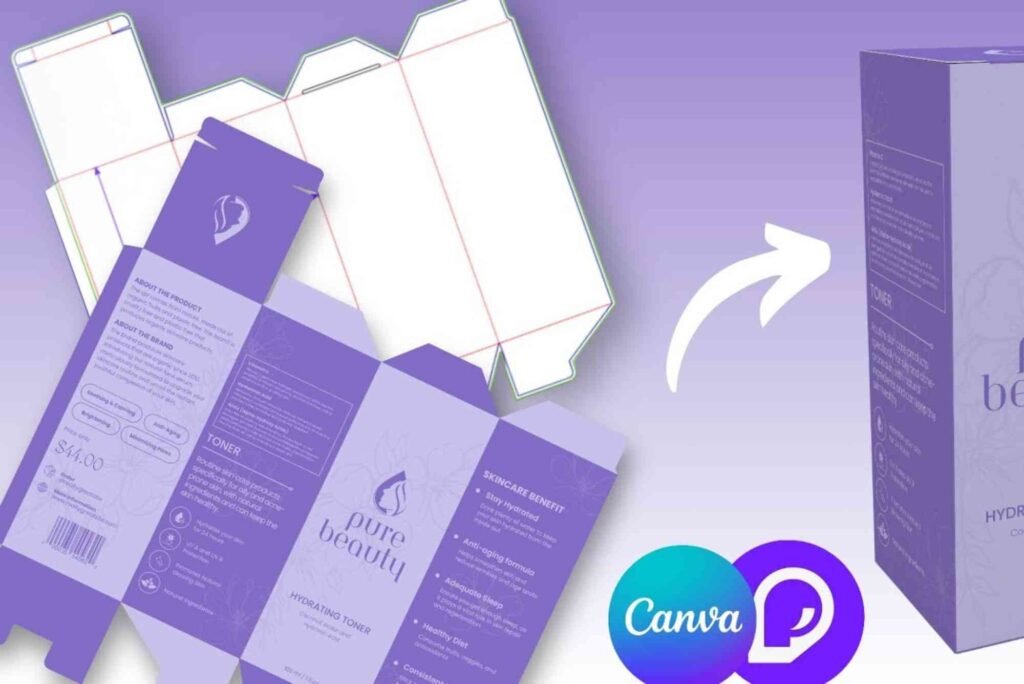
Ask your printer or packaging supplier for a dieline whenever possible. A dieline shows where folds, cuts and other production elements will appear.
Choose the Right Layout
The layout should guide the customer’s attention naturally. The product name should usually be easy to identify.
Supporting information can then appear in a logical order. Avoid placing important text close to edges, folds or cutting areas.
A clean layout often creates a more premium appearance than a design filled with decorative elements.
Select Suitable Colours
Colour plays an important role in brand recognition. Choose a limited colour palette that reflects your brand personality.
Contrast is also important. Text should remain readable against its background.
Before finalising your canva packaging design, check how the colours may appear when printed. Screen colours can differ from printed colours.
Use Appropriate Typography
Typography should be attractive but functional. Avoid using too many different fonts on one package.
A practical approach is to use one font for headings and another complementary font for supporting information.
Always check readability at the actual size of the packaging. Small text that looks fine on a computer screen may become difficult to read after printing.
Important Elements of Canva Packaging Design
Effective packaging usually combines branding, information and visual appeal.
| Packaging Element | Purpose | Design Consideration |
|---|---|---|
| Brand name | Builds recognition | Make it clearly visible |
| Product name | Identifies the product | Use strong hierarchy |
| Product image | Shows or represents the product | Keep it sharp and relevant |
| Description | Explains the product | Keep wording concise |
| Ingredients | Provides product information | Use readable text |
| Instructions | Helps customers use the product | Maintain clear spacing |
| Contact details | Supports customer communication | Keep them easy to find |
| Barcode | Supports retail operations | Leave sufficient space |
| Social media | Encourages engagement | Use only relevant platforms |
The exact requirements depend on the product and market. Some products also require regulatory information, warnings, nutritional details or certification marks.
Therefore, check applicable packaging requirements before sending artwork to production.
Canva Packaging Design for Different Products
Different products require different approaches. A single packaging style will not work equally well for every industry.
Food Packaging
Food packaging should communicate freshness, quality and product information. Strong product photography can help customers understand what they are buying.
However, food packaging may also require specific information. Always confirm the legal requirements applicable to your product and market.
Cosmetics Packaging
Cosmetic packaging often relies heavily on visual identity. Minimal layouts, elegant typography and carefully selected colours can create a premium impression.
For beauty brands, consistency across boxes, labels and containers can also strengthen recognition.
Candle Packaging
Candle packaging can use atmospheric photography, subtle typography and distinctive colour palettes. The design should communicate the fragrance or mood without becoming visually overwhelming.
Retail Product Boxes
Retail boxes need to work from different viewing distances. The front should communicate the essential message quickly.
Additional information can be positioned on the sides or back of the package.
Making Canva Packaging Design Print-Ready
Designing packaging and preparing packaging for production are not always the same thing.
Before printing, check the document dimensions and ensure the artwork matches the supplier’s specifications.
Bleed is another important consideration. It allows background colours and images to extend beyond the final cutting area.
You should also keep essential text and logos inside the safe area. This reduces the risk of important content being cut or positioned too close to an edge.
For professional production, confirm the required colour mode and file format with your printer.
This is where discussions about Custom Packaging can become valuable. Packaging suppliers may provide technical specifications that influence the design from the beginning.
Common Canva Packaging Design Mistakes
Even an attractive concept can become ineffective when basic packaging principles are ignored.
Too Much Information
Customers should not have to search through excessive text to understand the product.
Prioritise the information that matters most. Use headings, spacing and typography to establish a clear hierarchy.
Inconsistent Branding
Changing fonts, colours and logos across different packaging products can weaken brand recognition.
Create a consistent visual system and reuse it across your packaging range.
Poor Image Quality
Low-resolution images can appear blurry when printed. Always use suitable, high-quality images for production artwork.
Ignoring Dielines
Designing without understanding the packaging structure can cause important elements to land on folds or cuts.
Always work from the correct template or dieline.
Overusing Templates
Canva templates provide a useful starting point. However, copying a template without meaningful customisation can make your packaging look generic.
Adapt the structure to your brand instead.
How to Make Canva Packaging Design Look Professional
Professional packaging is usually the result of thoughtful decisions rather than excessive decoration.
Start with a clear brand message. Then choose a limited colour palette and establish typography that matches the product.
Use whitespace deliberately. Empty space can improve readability and give the package a more sophisticated appearance.
Photography should also support the product rather than distract from it.
Finally, print a physical proof whenever possible. Looking at the design on paper or packaging material can reveal problems that are difficult to notice on a screen.
For further practical guidance, researching print & finishing insights can help you understand how materials, coatings and production techniques affect the final appearance.
How Packaging Location Affects Design
Packaging is not only about the artwork itself. Where information appears can affect how customers understand the product.
The front panel should normally deliver the primary message. Supporting information can be placed on side or rear panels.
For physical packaging projects, understanding the Buddy Packaging Location concept can also help when planning where branding and product information should appear.
The goal is simple: customers should quickly understand what the product is, why it matters and who made it.
Canva Packaging Design Best Practices
A successful canva packaging design should balance creativity and functionality.
Use a clear visual hierarchy so customers immediately recognise the brand and product. Keep the colour palette controlled and choose fonts that remain readable.
Always consider the physical packaging structure before completing the artwork. Check bleed, safe areas and image quality before exporting the final file.
Most importantly, remember that packaging is part of your overall customer experience. It should look appealing while remaining practical and informative.
Frequently Asked Questions About Canva Packaging Design
Can Canva Be Used for Packaging Design?
Is Canva good for packaging design?
Yes. Canva can be useful for creating packaging concepts, labels and simple packaging artwork. It is particularly suitable for small businesses and beginners.
However, complex packaging projects may require professional design software and specialist production knowledge.
Can I create a box template in Canva?
Yes. You can create a custom-sized design in Canva and work from a packaging template or dieline.
For accurate production, use dimensions supplied by your packaging manufacturer.
Can You Print Packaging From Canva?
Can Canva print packaging?
Canva offers printing services for various products, although available packaging options can vary by region and product type.
For specialist packaging, you may instead export your artwork and send it to a dedicated packaging printer.
What format should packaging artwork be?
The required format depends on the printer. PDF is commonly used for professional print production.
Always ask your printer about file format, bleed, colour requirements and resolution before exporting.
What Size Should Packaging Design Be?
How do I know what size to use in Canva?
Use the exact dimensions supplied by your packaging manufacturer. For folding cartons, request the correct dieline.
Do not estimate dimensions because even small measurement errors can affect production.
Is Canva Packaging Design Free?
Can I design packaging in Canva for free?
Canva provides free design features, although some templates, graphics and resources require a paid plan.
You can still create effective packaging using free elements and your own brand assets.
Conclusion: Create Better Packaging With Canva
Canva packaging design gives businesses an accessible way to develop attractive and consistent packaging concepts. Its straightforward tools make it easier to experiment with layouts, colours, typography and imagery.
However, successful packaging requires more than good-looking graphics. Accurate measurements, strong hierarchy, readable typography and print preparation are equally important.
Start with your product and audience. Then build a design that communicates your brand clearly. Test the design physically before committing to a large production run.
If you are developing packaging for a new product, begin your concept in Canva and discuss the final specifications with a professional packaging supplier. This approach can help turn a creative idea into packaging that looks polished, practical and ready for customers.
Related Reading: cd packaging design