T Shirt Printing Design Size: The Complete Guide
Creating the perfect t shirt starts with the right design size. Whether you are a hobbyist or running a small printing business, understanding t shirt printing design size is essential. The size of your design impacts not just the aesthetics, but also the print quality and overall appeal of your t shirt.
Getting it wrong can make your artwork look awkward, distorted, or unreadable. This guide explains everything you need to know about sizing your t shirt designs, including practical tips and frequently asked questions.
Understanding T Shirt Printing Design Size
The size of a t shirt design is determined by the shirt type, printing method, and intended visual impact. Knowing the basics ensures your design looks professional across all shirt sizes.
Standard Printing Dimensions
Most adult t shirts use a printable area between 12 and 16 inches in width for chest designs. For smaller youth sizes, the width may reduce to 8-12 inches. Vertical placement also matters—typical designs start 2-3 inches below the collar to sit nicely on the chest.
Factors Affecting Design Size
Several factors influence the ideal t shirt printing design size. Fabric type, shirt fit, and printing method can change how your artwork appears.
Screen printing, for example, works best with designs that are bold and not too detailed for small areas. Digital printing allows for more intricate designs but still requires attention to size for clarity.
Choosing the Right Size for Different Shirt Styles
Different t shirt styles require slightly different design dimensions to maintain balance and proportion.
Standard T Shirts
Classic unisex t shirts usually accommodate larger designs centered on the chest. Aim for around 12 inches wide for adult sizes to ensure the design is visible without overwhelming the shirt.
Women’s Fit T Shirts
Women’s cut shirts have a narrower shoulder width, so design size should be smaller than unisex shirts. Reducing the width by 1-2 inches helps the design fit properly without stretching.
Youth and Kids T Shirts
For youth t shirts, smaller designs are necessary. Stick to 8-10 inches wide, keeping placement proportionate to the child’s body size. Oversized designs can appear clumsy or awkward.
Optimising Your Design for Different Printing Methods
Not all printing techniques allow the same flexibility in design size. Understanding the method ensures the best results.
Screen Printing
Screen printing is ideal for bold, simple designs. Limit your size to around 12-14 inches for adult shirts. Tiny text or fine details may blur, so keep designs crisp and minimal.
Direct-to-Garment (DTG) Printing
DTG printing works well for detailed artwork and full-colour images. You can print larger designs up to 16 inches wide, but ensure high-resolution files for clarity.
Heat Transfer and Vinyl Printing
Heat transfer and vinyl are versatile but require careful sizing. Vinyl tends to shrink when applied, so slightly enlarging the design in your file helps maintain proportions after pressing.
Design Placement: Size Isn’t the Only Factor
The perfect t shirt printing design size isn’t just about width. Placement on the shirt determines visual impact and comfort.
Chest Placement
Chest designs are the most common. Center the design horizontally and place the top 2-3 inches below the collar for optimal viewing.
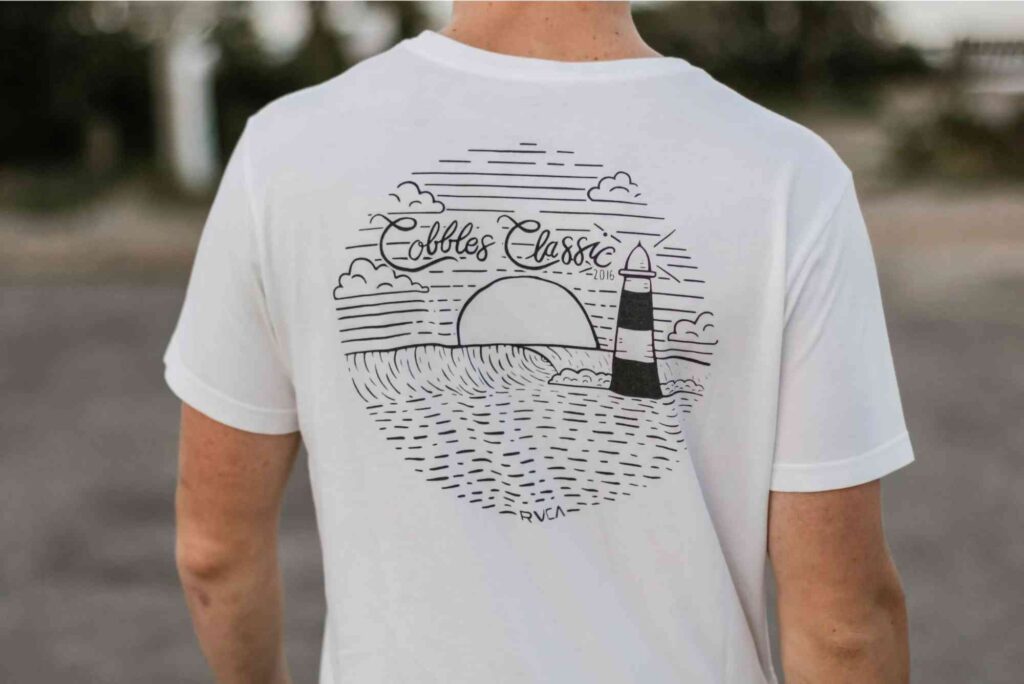
Back Prints
Back prints allow larger designs, typically 14-16 inches wide. Consider how the shirt moves when worn to prevent distortion.
Sleeve and Pocket Designs
Smaller designs work best on sleeves or pockets, usually 3-5 inches. These areas are perfect for logos or subtle accents rather than full artwork.
Design File Guidelines for Perfect Size
Even with the correct physical size, your digital file must be optimised to ensure quality printing.
Resolution and DPI
For sharp prints, design files should be 300 DPI (dots per inch) at the final print size. Low-resolution files can appear pixelated or blurry.
Vector vs Raster
Vector files are ideal for logos and scalable designs because they maintain quality at any size. Raster images can work but must be high resolution for larger prints.
Colour Profiles
Use CMYK colour mode for print. RGB files may look fine on screen but can appear dull or off-colour when printed.
Common Mistakes in T Shirt Printing Design Size
Avoid these errors to ensure professional results:
- Using the same design size for all shirt sizes
- Ignoring printing method limitations
- Placing designs too close to collars or seams
- Failing to check resolution for large prints
These mistakes can make a design appear unprofessional or even ruin the shirt after printing.
Tips for Perfect T Shirt Design Size
- Always mock up your design on a shirt template to visualise size
- Adjust width and height proportionally across different shirt sizes
- Keep fine details minimal for smaller prints
- Test print before mass production
For businesses, combining t shirt designs with smart packaging can boost brand appeal. Consider looking into Custom Packaging or exploring packaging design tips to enhance your product presentation. A well-designed shirt and packaging combo can significantly improve customer experience.
Choosing the right t shirt printing design size is crucial for professional-looking apparel. Consider shirt type, printing method, and placement to get the perfect fit. Always check your file resolution and adjust your designs for different sizes. By following these guidelines, your prints will always look sharp and appealing.
Ready to bring your t shirt ideas to life? Explore local printing options at Buddy Packaging Location for expert guidance on both apparel and packaging solutions.
FAQ: T Shirt Printing Design Size
What is the ideal t shirt printing design size for adults?
For adult t shirts, 12-16 inches wide is standard. Placement should be 2-3 inches below the collar.
How do I resize a design for kids’ t shirts?
Reduce the width to 8-10 inches and adjust vertical placement proportionally to the child’s size.
Can I use the same design for screen printing and DTG?
Yes, but screen printing requires simpler designs with bold lines. DTG allows more detail.
What resolution should my t shirt design file have?
A minimum of 300 DPI at the intended print size ensures crisp and clear prints.
Can I print large designs on small shirts?
Oversized designs may look awkward. Always scale proportionally to the shirt size for balance and aesthetics.
buddypackaging.co.uk offers innovative and eco-friendly packaging solutions for businesses of all sizes. From custom boxes to sustainable materials, they help brands stand out while caring for the environment. Their expert team ensures high-quality, reliable, and stylish packaging that meets every need.